Why You Need to Think Twice Before Using Lensa AI & Other Self-Portrait Apps

Free Iphone Smartphone photo and picture

It’s a common theme. You begin seeing these amazing CGI images of your friends on Facebook or Instagram. You think, “How can I make one?”

Filters and self-portrait apps have come a long way. You can now make yourself look like Hollywood’s version of a character in the next hit animated film. It still kind of looks like you, only a dream version with “perfect” hair, skin, and facial features.

The latest of these modern vanity marvels to make the rounds is Lensa AI. You upload about 10 photos so the app can feed that data into its AI algorithm. Then, once it maps your facial features, it generates several fantasy selfies of you.

These magical avatars don’t come for free though. While you can download the app for free and use it in a limited fashion, you need to pay to do more. To get unlimited access for one week, it’s $2.99. There are several pricing tiers for its avatar packs and membership access. These range from $3.99 for Avatars Pack 1 to $35.99 for full membership.

It sounds like a little harmless digital fun, right? That’s what many companies making apps like this like you to think. Vanity is an easy sell, and who doesn’t want to have a fabulous profile pic?

But for Lensa AI and several similar self-portrait apps, you’re paying more than you know. The cost comes from the data privacy rights you’re giving up. And these can go far beyond the app itself.

Why Worry About Data Privacy with Lensa AI & Similar Apps?

Thanks to laws like GDPR, software and app developers need to tell you what they do with your data. Looking at the app at the Mac App Store, a few alarming things jump out.

Data Used to Track You

Once you download the Lensa AI app, it can track your phone activity. The app store states that the app may use purchases and unique identifiers to track you. And this doesn’t mean only tracking you while in Lensa AI. It can track you across websites and apps owned by other companies.

Data Collected

Lensa AI scours your device for a lot of different data points. By downloading it, you permit it to do this. Some of the tracking links to you personally (such as linked to your name, IP address, or phone number). It collects a lot of other data, but not with your name or another identifier on it.

Data collected and linked to you:

  • User content (such as the images you upload)

Data collected, but not linked to you:

  • Purchases you make on websites or apps
  • Usage data for apps, etc.
  • Identifiers (this isn’t specified, but could mean things like city or gender)
  • Diagnostics from your device

Loss of Rights to Your Uploaded Images

What apps like Lensa AI do with your data is a grey area. Many tech companies, such as Facebook, have been known to act irresponsibly with user data. Many are purposely vague in their terms and conditions, leaving the door open.

One section from the Lensa AI Terms that users agree to states the following:

“…solely for the purposes of operating or improving Lensa, you grant us a time-limited, revocable, non-exclusive, royalty-free, worldwide, fully-paid, transferable, sub-licensable license to use, reproduce, modify, distribute, create derivative works of your User Content, without any additional compensation to you…”

For the sole purpose of “operating” Lensa, could mean anything. It could mean that to make more money to operate the business, the company needs to use your images. Note that it also states it can modify, distribute, etc. YOUR user content.

Things You Can Do to Protect Your Data Privacy

Don’t Immediately Jump on Every Fad

This one may be hard when you see all your friends using a new app. It’s natural to want to be a part of that. But try waiting a week. Most likely those avatar images from the latest selfie app won’t be blowing up your feed anymore.

Read App Terms & Conditions

Take the time to read an app’s terms. You are often giving up more data privacy rights than you realize. This includes giving an app the ability to track just about everything you do on your device. Be aware of what’s at risk before you download a new app.

Restrict Data Collection

If you can’t resist an app’s charms, at least make it as secure as possible. This includes taking the time to restrict its data collection features, where possible.

Use your phone’s privacy and security settings to turn off data sharing. For the Lensa AI app, you can also contact the company to request that it delete your data from its servers. Its privacy policy states to email privacy@lensa-ai.com for questions and concerns.

Get a Device Privacy Checkup

The more apps you use, the more complicated data privacy can get. Don’t leave it to chance. We’ll be happy to help. Give us a call today to schedule a device privacy checkup.


Featured Image Credit

This Article has been Republished with Permission from The Technology Press.

Microsoft Forms: One of the Handiest Freebies in Microsoft 365

black laptop computer beside black wireless mouse

Microsoft 365 is one of the most popular cloud platforms in the world, with about 345 million paid seats. Microsoft cloud tools numbers were up 32% in Q3 2022 compared to the previous year.

One of the reasons for its continued growth is the suite of cloud tools offered in the service. Users get a stable of over 20 different apps, including the core MS Office suite.

With so many different apps, it’s not uncommon for some to go unused. Companies may not even be aware they have access to these other helpful tools. One of the handiest apps you get with a Microsoft 365 subscription is Microsoft Forms.

From sending year-end customer surveys to assessing change readiness, Forms makes it easy. This online survey and form-building tool has a lot to offer organizations. And if you have a subscription to Microsoft 365, then you already get Forms included for free.

What Is Microsoft Forms?

Microsoft Forms is a drag-and-drop form, quiz, and survey creator. It’s simple to use and allows you to send out surveys via a link. Recipients can fill out your form online from any device.

Once recipients fill out the survey, the results come into the software instantly. You can see the collated results charted in the software. You can also export the results to Excel.

How to Get Started in Forms:

  1. Visit Forms.office.com and log into your Microsoft account.
  2. Choose “New Form” or “New Quiz: from the top menu
Forms
  1. OR you can choose to explore the built-in templates.
Templates-1
Templates-2
  1. Click “Add New” to add a new form field. You can choose from field types:
    • Choice (i.e., multiple-choice question)
    • Text
    • Rating
    • Date
    • Ranking
    • Likert (a scale that records attitudes/opinions about a topic)
    • Net Promoter Score® (a scale from “not likely” to “extremely likely”)
    • Section (separator that can include a title and image)
  2. Enter your questions.
  3. Once finished, click “Send” at the top. You can distribute the survey using the following options:
    • Link to a web form
    • Email
    • QR code
    • Embed in a web page
    • Via Facebook or Twitter
  4. View responses on the “Responses” tab
Responses tab

Advantages of Using Microsoft Forms

It’s Included in Microsoft 365 Subscriptions

If you already subscribe to Microsoft 365, then it makes sense to use Forms. It can save you money if you’re using a separate survey tool, like Survey Monkey. It’s easily accessible by signing in with your Microsoft account.

It Saves Time

Sending a survey by email is time-consuming. You have to worry about emails bouncing due to an attachment. You also need to spend time collating all the results as they come in.

Using MS Forms can save you a lot of time. People don’t need to download anything or open an email file attachment. They simply follow your link and fill out the form online. As soon as they fill the survey out, you get the result. Forms also collates all the answers for you.

Get Charted Results Automatically

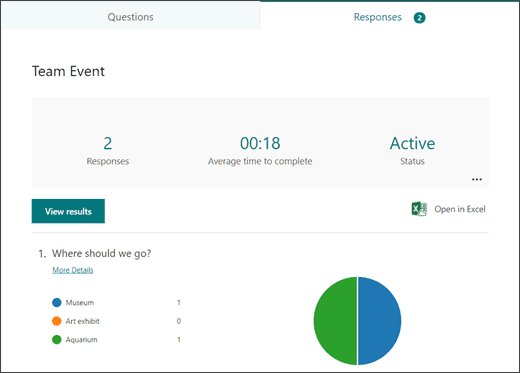
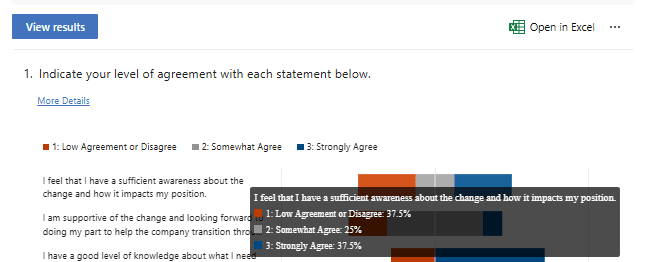
You can quickly see the results of the survey in meaningful graphs. Forms makes it simple to export to Excel if you want to upload the survey results into another platform.

On the “Responses” tab, you can hover over the result graphs to see the details.

Charted Results
Image from ocmsolution.com

It’s Easy to Use

There’s a very low learning curve with Microsoft Forms. The interface is intuitive and simple, so just about everyone can jump in and start using it.

What Are Some Ways You Can Leverage Microsoft Forms?

Annual Customer Satisfaction Survey

Using a web-based survey can increase your response rate from customers. They can fill out your satisfaction survey from any device, making it quick and easy for them.

You can see results instantly. Then, chart them to gain insights into what your business is doing right, and what you can improve upon.

Employee Security Awareness Quiz

Send a security awareness quiz to your employees using Forms. It can be easily integrated into your cybersecurity awareness training. The platform also tells you the average response time per person.

Change Readiness Survey

Change management is a growing focus of many organizations. This is due to the speed of technology-driven transitions. You can use Forms to improve user readiness for change adoption. Create and send out a change readiness survey to affected groups.

Event Registrations

Are you hosting an event? You can easily gather registration details. Send out a Forms link via QR code, social media, text, or email.

Volunteer Registration Form

Embed an MS Forms registration form on your web page to sign up volunteers. The platform will automatically collate different talents or other volunteer information. This helps you better match people’s talents to your needs.

And More

You’ll find more ideas from the Forms templates. Such as:

  • Competitive analysis study
  • Post-event feedback survey
  • Office facility request form
  • Employee satisfaction survey
  • Product pricing survey
  • Food catering request form
  • Save the date form
  • Course enrollment form

Would You Like to Get More Out of Microsoft 365?

There is a good chance that your company may be leaving some value on the table with M365. Give us a call today to learn more about our Microsoft 365 support services.


Featured Image Credit

This Article has been Republished with Permission from The Technology Press.
Data Backup Is Not Enough, You Also Need Data Protection

Free Security Computer Science photo and picture

The need to back up data has been around since floppy disks. Data loss happens due to viruses, hard drive crashes, and other mishaps. Most people using any type of technology have experienced data loss at least once.

There are about 140,000 hard drive crashes in the US weekly. Every five years, 20% of SMBs suffer data loss due to a major disaster. This has helped to drive a robust cloud backup market that continues to grow.

But one thing that’s changed with data backup in the last few years is security. Simply backing up data so you don’t lose it, isn’t enough anymore. Backing up has morphed into data protection.

What does this mean?

It means that backups need more cybersecurity protection. They face threats such as sleeper ransomware and supply chain attacks. Cloud-based backup has the benefit of being convenient, accessible, and effective. But there is also a need for certain security considerations with an online service.

Companies need to consider data protection when planning a backup and recovery strategy. The tools used need to protect against the growing number of threats.

Some of the modern threats to data backups include:

  • Data Center Outage: The “cloud” basically means data on a server. That server is internet accessible. Those servers can crash. Data centers holding the servers can also have outages.
  • Sleeper Ransomware: This type of ransomware stays silent after infecting a device. The goal is to have it infect all backups. Then, when it’s activated, the victim doesn’t have a clean backup to restore.
  • Supply Chain Attacks: Supply chain attacks have been growing. They include attacks on cloud vendors that companies use. Those vendors suffer a cyberattack that then spreads throughout their clients.
  • Misconfiguration: Misconfiguration of security settings can be a problem. It can allow attackers to gain access to cloud storage. Those attackers can then download and delete files as they like.

What to Look for in a Data Protection Backup System

Just backing up data isn’t enough. You need to make sure the application you use provides adequate data protection. Here are some of the things to look for when reviewing a backup solution.

Ransomware Prevention

Ransomware can spread throughout a network to infect any data that exists. This includes data on computers, servers, and mobile devices. It also includes data in cloud platforms syncing with those devices.

95% of ransomware attacks also try to infect data backup systems.

It’s important that any data backup solution you use have protection from ransomware. This type of feature restricts automated file changes that can happen to documents.

Continuous Data Protection

Continuous data protection is a feature that will back up files as users make changes. This differs from systems that back up on a schedule, such as once per day.

Continuous data protection ensures that the system captures the latest file changes. This mitigates data loss that can occur if a system crashes before the next backup. With the speed of data generation these days, losing a day’s worth of data can be very costly.

Threat Identification

Data protection incorporates proactive measures to protect files. Look for threat identification functions in a backup service. Threat identification is a type of malware and virus prevention tool.

It looks for malware in new and existing backups. This helps stop sleeper ransomware and similar malware from infecting all backups.

Zero-Trust Tactics

Cybersecurity professionals around the world promote zero-trust security measures. This includes measures such as multi-factor authentication and application safelisting.

A zero-trust approach holds that all users and applications need ongoing authentication. So, just because a user is logged into the system today, doesn’t mean they are completely trusted.

Some of the zero-trust features to look for include:

  • Multi-factor authentication
  • Distinct file and folder permissions
  • Contextual authentication
  • Verification of permissions for file changes

Backup Redundancy

If you back up to a USB drive or CD, you have one copy of those files. If something happens to that copy, you could experience data loss.

Cloud backup providers should have backup redundancy in place. This means that the server holding your data mirrors that data to another server. This prevents data loss in the case of a server crash, natural disaster, or cyberattack.

Air Gapping for More Sensitive Data

Air gapping is a system that keeps a copy of your data offline or separated in another way. This would entail making a second backup copy of your data. Then, putting it on another server. A server disconnected from external sources.

This is a feature that you may want to seek out if you deal with highly sensitive data. It helps to ensure that you have at least one other copy of your backup. A copy walled off from common internet-based attacks.

Need Help With Secure Backup & Data Protection Solutions?

Have you updated your backup process for today’s threats? Give us a call today to schedule a chat about data backup and protection.


Featured Image Credit

This Article has been Republished with Permission from The Technology Press.

8 Reasons Every Company Is Now a Technology Company

person using MacBook Pro

Whether you sell shoes or run an accounting firm, you need some type of technology to operate. Today’s companies aren’t just in the business of selling their own goods and services anymore. They also must master various types of digital tools.

These include software, payment systems, computers, Wi-Fi networks, mobile devices, and more. Companies also need to protect their devices and network.. If that technology isn’t working, it can impact a business significantly.

98% of surveyed organizations say that just one hour of IT downtime costs more than $100,000. The reliance on technology means that every company is now a technology company.

This is the case no matter what products you sell or services you provide. Let’s discuss exactly why this is the case in today’s world.

What Makes Technology a Backbone of Any Business?

1. Technology Is a Critical Part of Business

Even farmers use tech to check commodity prices, sell livestock, and keep their books. Most companies couldn’t operate without their software. Or without databases filled with important information.

IT downtime is so devastating for this very reason. Remember the breaches impacting global meat producer JBS and Colonial pipeline? Those companies had to halt operations because of ransomware attacks.

They both paid the ransom to their attackers so they could begin operating again. Without the technology that’s become a normal part of our day, a lot of companies would close.

2. Customers Expect an Excellent Digital Experience

Customer experience came in first in a survey of top business priorities for the next 5 years. Nearly 46% of respondents said it was at the top of their list.

If a customer has just one bad experience with your company, they will likely go elsewhere. In a digital world, those experiences are often:

  • Navigating your website
  • Checkout experience
  • Appointment scheduling ease
  • Shipping notifications
  • Helpfulness of online chat
  • Response time from customer support
  • Ability to contact your company via social media

To keep up with consumer expectations in 2023 and beyond, means you need to use technology. From your website to your payment experience, people expect a smooth digital flow.

3. Employees Need Devices to Drive Productivity

How do employees work productivity without the use of a computer, tablet, or mobile device? These devices keep staff connected to each other and your customer data. Devices enable communication and are how much of the work in offices gets done. If they don’t run well, business productivity suffers.

4. AI & Automation Help Companies Stay Competitive

AI and automation help organizations move faster. AI can personalize a consumer shopping experience. Automation can help sales teams close 30% more deals and improve conversions by over 200%.

To stay competitive, companies must integrate technology tools with AI and automation capabilities. This means they need to know the best ways to use these tools. Plus, integrate them well with existing solutions.

5. Information Is Being Generated at a Rapid Pace

Companies generate information digitally at a dizzying pace. Can you imagine what it would be like if you had to go back to all the paper files? You’d need a separate building just for all the filing cabinets.

Files, documents, and customer records are largely digital now. Keeping track of all that information and making it searchable requires technology skills.

6. Vendors/Suppliers Are Leaving Legacy Systems Behind

Think of the vendors you use to run your business. Could you interact with any of them offline only? No email, no digital documents? In most cases, the answer is, “No.”

The companies that you rely on for your business are also “technology companies” in the same way. Most will be leaving behind legacy systems like fax machines and paper documents. Thus, you need to use digital means to interact with them.

7. It’s Difficult to Grow Without Tech Innovation

People are limited by what they can mentally and physically do in a day. Computers and technology have exponentially increased that. They do a lot of the processing and manual work.

The cloud is often touted as leveling the playing field for small businesses. It allows smaller companies to leverage technology to do more affordably.

It’s hard to continue growing your business without the smart use of digital tools. This includes reviewing your technology infrastructure and looking at innovations on the horizon.

8. Business Continuity Needs

Business continuity is about keeping your company running despite any crisis events. One natural disaster could severely impact a building and everything in it. But, if you are storing your data in the cloud and using cloud software, your business can still operate.

Companies that aren’t employing backup systems are at significant risk. Tech solutions create the ability to continue operating from anywhere, increasing business resiliency.

What Does Your Innovation Roadmap Look Like?

Using technology securely and to its fullest can be a full-time job. Give us a call today, we can help take that burden off your shoulders.


Featured Image Credit

This Article has been Republished with Permission from The Technology Press.

6 Steps to Effective Vulnerability Management for Your Technology

red padlock on black computer keyboard

Technology vulnerabilities are an unfortunate side effect of innovation. When software companies push new updates, there are often weaknesses in the code. Hackers exploit these. Software makers then address the vulnerabilities with a security patch. The cycle continues with each new software or hardware update.

It’s estimated that about 93% of corporate networks are susceptible to hacker penetration. Assessing and managing these network weaknesses isn’t always a priority for organizations. Many suffer breaches because of poor vulnerability management.

61% of security vulnerabilities in corporate networks are over 5 years old.

Many types of attacks take advantage of unpatched vulnerabilities in software code. This includes ransomware attacks, account takeover, and other common cyberattacks.

Whenever you see the term “exploit” when reading about a data breach, that’s an exploit of a vulnerability. Hackers write malicious code to take advantage of these “loopholes.” That code can allow them to elevate privileges. Or to run system commands or perform other dangerous network intrusions.

Putting together an effective vulnerability management process can reduce your risk. It doesn’t have to be complicated. Just follow the steps we’ve outlined below to get started.

Vulnerability Management Process

Step 1. Identify Your Assets

First, you need to identify all the devices and software that you will need to assess. You’ll want to include all devices that connect to your network, including:

  • Computers
  • Smartphones
  • Tablets
  • IoT devices
  • Servers
  • Cloud services

Vulnerabilities can appear in many places. Such as the code for an operating system, a cloud platform, software, or firmware. So, you’ll want a full inventory of all systems and endpoints in your network.

This is an important first step, so you will know what you need to include in the scope of your assessment.

Step 2: Perform a Vulnerability Assessment

Next will be performing a vulnerability assessment. This is usually done by an IT professional using assessment software. This could also include penetration testing.

During the assessment, the professional scans your systems for any known vulnerabilities. The assessment tool matches found software versions against vulnerability databases.

For example, a database may note that a version of Microsoft Exchange has a vulnerability. If it detects that you have a server running that same version, it will note it as a found weakness in your security.

Step 3: Prioritize Vulnerabilities by Threat Level

The assessment results provide a roadmap for mitigating network vulnerabilities. There will usually be several, and not all are as severe as others. You will next need to rank which ones to address first.

At the top of the list should be those experts consider severe. Many vulnerability assessment tools will use the Common Vulnerability Scoring System (CVSS). This categorizes vulnerabilities with a rating score from low to critical severity.

You’ll also want to rank vulnerabilities by your own business needs. If a software is only used occasionally on one device, you may consider it a lower priority to address. While a vulnerability in software used on all employee devices, you may rank as a high priority.

Step 4: Remediate Vulnerabilities

Remediate vulnerabilities according to the prioritized list. Remediation often means applying an issued update or security patch. But it may also mean upgrading hardware that may be too old for you to update.

Another form of remediation may be ringfencing. This is when you “wall off” an application or device from others in the network. A company may do this if a scan turns up a vulnerability for which a patch does not yet exist.

Increasing advanced threat protection settings in your network can also help. Once you’ve remediated the weaknesses, you should confirm the fixes.

Step 5: Document Activities

It’s important to document the vulnerability assessment and management process. This is vital both for cybersecurity needs and compliance.

You’ll want to document when you performed the last vulnerability assessment. Then document all the steps taken to remediate each vulnerability. Keeping these logs will be vital in the case of a future breach. They also can inform the next vulnerability assessment.

Step 6. Schedule Your Next Vulnerability Assessment Scan

Once you go through a round of vulnerability assessment and mitigation, you’re not done. Vulnerability management is an ongoing process.

In 2022, there were over 22,500 new vulnerabilities documented. Developers continue to update their software continuously. Each of those updates can introduce new vulnerabilities into your network.

It’s a best practice to have a schedule for regular vulnerability assessments. The cycle of assessment, prioritization, mitigation, and documentation should be ongoing. This fortifies your network against cyberattacks. It removes one of the main enablers of hackers.

Get Started with a Vulnerability Assessment

Take the first step towards effective vulnerability management. We can help you fortify your network against attacks. Give us a call today to schedule a vulnerability assessment to get started.


Featured Image Credit

This Article has been Republished with Permission from The Technology Press.
Is That Really a Text from Your CEO… or Is It a Scam?

Free Shinjuku Ward Building photo and picture

Imagine you’re going about your day when suddenly you receive a text from the CEO. The head of the company is asking for your help. They’re out doing customer visits and someone else dropped the ball in providing gift cards. The CEO needs you to buy six $200 gift cards and text the information right away.

The message sender promises to reimburse you before the end of the day. Oh, and by the way, you won’t be able to reach them by phone for the next two hours because they’ll be in meetings. One last thing, this is a high priority. They need those gift cards urgently.

Would this kind of request make you pause and wonder? Or would you quickly pull out your credit card to do as the message asked?

A surprising number of employees fall for this gift card scam. There are also many variations. Such as your boss being stuck without gas or some other dire situation that only you can help with.

This scam can come by text message or via email. What happens is that the unsuspecting employee buys the gift cards. They then send the numbers back. They find out later that the real company CEO wasn’t the one that contacted them. It was a phishing scammer.

The employee is out the cash.

Without proper training, 32.4% of employees are prone to fall for a phishing scam.

Why Do Employees Fall for Phishing Scams?

Though the circumstances may be odd, many employees fall for this gift card scam. Hackers use social engineering tactics. They manipulate emotions to get the employee to follow through on the request.

Some of these social engineering tactics illicit the following:

  • The employee is afraid of not doing as asked by a superior
  • The employee jumps at the chance to save the day
  • The employee doesn’t want to let their company down
  • The employee may feel they can advance in their career by helping

The scam’s message is also crafted in a way to get the employee to act without thinking or checking. It includes a sense of urgency. The CEO needs the gift card details right away. Also, the message notes that the CEO will be out of touch for the next few hours. This decreases the chance the employee will try to contact the real CEO to check the validity of the text.

Illinois Woman Scammed Out of More Than $6,000 from a Fake CEO Email

Variations of this scam are prevalent and can lead to significant financial losses. A company isn’t responsible if an employee falls for a scam and purchases gift cards with their own money.

In one example, a woman from Palos Hills, Illinois lost over $6,000. This was after getting an email request from who she thought was her company’s CEO.

The woman received an email purporting to be from her boss and company CEO. It stated that her boss wanted to send gift cards to some selected staff that had gone above and beyond.

The email ended with “Can you help me purchase some gift cards today?” The boss had a reputation for being great to employees, so the email did not seem out of character.

The woman bought the requested gift cards from Target and Best Buy. Then she got another request asking to send a photo of the cards. Again, the wording in the message was very believable and non-threatening. It simply stated, “Can you take a picture, I’m putting this all on a spreadsheet.”

The woman ended up purchasing over $6,500 in gift cards that the scammer then stole. When she saw her boss a little while later, her boss knew nothing about the gift card request. The woman realized she was the victim of a scam.

Tips for Avoiding Costly Phishing Scams

Always Double Check Unusual Requests

Despite what a message might say about being unreachable, check in person or by phone anyhow. If you receive any unusual requests or one relating to money, verify it. Contact the person through other means to make sure it’s legitimate.

Don’t React Emotionally

Scammers often try to get victims to act before they have time to think. Just a few minutes of sitting back and looking at a message objectively is often all that’s needed to realize it’s a scam. Don’t react emotionally, instead ask if this seems real or is it out of the ordinary.

Get a Second Opinion

Ask a colleague, or better yet, your company’s IT service provider, to take look at the message. Getting a second opinion keeps you from reacting right away. It can save you from making a costly judgment error.

Need Help with Employee Phishing Awareness Training?

Phishing keeps getting more sophisticated all the time. Make sure your employee awareness training is up to date. Give us a call today to schedule a training session to shore up your team’s defenses.


Featured Image Credit

This Article has been Republished with Permission from The Technology Press.
6 Ways to Prevent Misconfiguration (the Main Cause of Cloud Breaches)

Free Lock Padlock illustration and picture

Misconfiguration of cloud solutions is often overlooked when companies plan cybersecurity strategies. Cloud apps are typically quick and easy to sign up for. The user often assumes that they don’t need to worry about security because it’s handled.

This is an incorrect assumption because cloud security is a shared model. The provider of the solution handles securing the backend infrastructure. But the user is responsible for configuring security settings in their account properly.

The problem with misconfiguration is huge. It’s the number one cause of cloud data breaches. It’s also an unforced error. Misconfiguration means that a company has made a mistake. It hasn’t adequately secured its cloud application.

Perhaps they gave too many employees administrative privileges. Or, they may have neglected to turn on a security function. One that prevented the downloading of cloud files by an unauthorized user.

Misconfiguration covers a wide range of negligent behavior. It all has to do with cloud security settings and practices. A finding in The State of Cloud Security 2021 report shed light on how common this issue is. 45% of organizations experience between 1 and 50 cloud misconfigurations per day.

Some of the main causes of misconfiguration are:

  • Lack of adequate oversight and controls
  • A team lacking security awareness
  • Too many cloud APIs to manage
  • No adequate cloud environment monitoring
  • Negligent insider behavior
  • Not enough expertise in cloud security

Use the tips below to reduce your risk of a cloud data breach and improve cloud security.

Enable Visibility into Your Cloud Infrastructure

Do you know all the different cloud apps employees are using at your business? If not, you’re not alone. It’s estimated that shadow IT use is approximately 10x the size of known cloud use.

When an employee uses a cloud app without authorization, it’s considered “shadow IT.” This is because the app is in the shadows so to speak, outside the purview of the company’s IT team.

How can you protect something you don’t know about? This is why shadow cloud applications are so dangerous. And why they often result in breaches due to misconfiguration.

Gain visibility into your entire cloud environment, so you know what you need to protect. One way you can do this is through a cloud access security application.

Restrict Privileged Accounts

The more privileged accounts you have, the higher the risk of a misconfiguration. There should be very few users that can change security configurations. You don’t want someone that doesn’t know better to accidentally open a vulnerability. Such as removing a cloud storage sharing restriction. It could leave your entire environment a sitting duck for hackers.

Audit privileged accounts in all cloud tools. Then, reduce the number of administrative accounts to a least needed to operate.

Put in Place Automated Security Policies

Automation helps mitigate human error. Automating as many security policies as possible helps prevent cloud security breaches.

For example, if you use a feature like sensitivity labels in Microsoft 365, you can set a “do not copy” policy. It will follow the file through each supported cloud application. Users don’t need to do anything to enable it once you put the policy in place.

Use a Cloud Security Audit Tool (Like Microsoft Secure Score)

How secure is your cloud environment? How many misconfigurations might there be right now? It’s important to know this information so you can correct issues to reduce risk.

Use an auditing tool, like Microsoft Secure Score. You want a tool that can scan your cloud environment and let you know where problems exist. It should also be able to provide recommended remediation steps.

Set Up Alerts for When Configurations Change

Once you get your cloud security settings right, they won’t necessarily stay that way. Several things can cause a change in a security setting without you realizing it. These include:

  • An employee with elevated permissions accidentally changes them
  • A change caused by an integrated 3rd party plug-in
  • Software updates
  • A hacker that has compromised a privileged user credential

Be proactive by setting up alerts. You should have an alert for any significant change in your cloud environment. For example, when the setting to force multi-factor authentication gets turned off.

If an alert is set up, then your team knows right away when a change occurs to an important security setting. This allows them to take immediate steps to research and rectify the situation.

Have a Cloud Specialist Check Your Cloud Settings

Business owners, executives, and office managers aren’t cybersecurity experts. No one should expect them to know how to configure the best security for your organization’s needs.

It’s best to have a cloud security specialist from a trusted IT company check your settings. We can help ensure that they’re set up to keep your data protected without restricting your team.

Improve Cloud Security & Lower Your Chances for a Data Breach

Most work is now done in the cloud, and companies store data in these online environments. Don’t leave your company at risk by neglecting misconfiguration. Give us a call today to set up a cloud security assessment.


Featured Image Credit

This Article has been Republished with Permission from The Technology Press.

The Pros & Cons of Tracking Your Employees’ Every Digital Movement

Free Man Wearing Brown Suit Jacket Stock Photo

Since the pandemic, employers around the world have needed to change. They’ve had to shift how their employees operate. Remote work is very much here to stay. Organizations and employees can both benefit from the work-from-home and hybrid work revolution.

Cost savings is a driver for supporting remote work. Employee morale and productivity also can be higher when employers grant this flexibility.

A majority of organizations support some type of remote work. Statistics show that:

  • 16% of companies are completely remote
  • 40% support hybrid office/remote working
  • 44% don’t allow employees to work remotely

While there are benefits, there are also challenges to this new environment. Employers worry about the cybersecurity risks of remote teams. Managers can find it more challenging to make sure employees are doing what they should do.

The remote and hybrid work environment has led to the rise of employee monitoring tools. These tools have mixed reviews from employees.

What Is Employee Monitoring Software?

Employee monitoring software tracks digital movements. This can include everything from general clock-in clock-out tracking to taking screenshots of an employee’s computer several times per hour.

Tracking tools like Hubstaff and BambooHR track many activities on a person’s computer. The information is then sent in a daily or weekly report to the company.

Items that these tools can track are:

  • Time clock
  • Keyboard activity
  • Keystrokes
  • Mouse activity
  • Websites visited
  • Screenshots of the desktop
  • Apps used and how long in use

The most invasive of tools can even track the sounds and video of the employee. Tracking can be visible, so the employee knows about it or hidden from the employee. It depends on the tool used and the ethical considerations of the employer.

This type of monitoring can benefit an organization worried about “productivity theft.” But it can also alienate good employees and torpedo morale and trust. We’ll go through the pros and cons to weigh before you set up this type of system.

Pros of Activity Monitoring Tools

Helps Managers Understand How Employees Spend Their Day

One feature of many tracking tools is the ability to track time by project. This helps managers understand where employees are prioritizing their time. Knowing how much time employees spend on a project helps with ROI projections.

Reduces Non-Work Activities During Working Hours

One thing that employers worry about with remote employees is that they will waste time. A manager doesn’t want to pay someone only to find out the employee spent half their time on Facebook.

About half of monitored employees spend 3+ hours per day on non-work activities. When employees know that their boss is monitoring their app usage, they’re less likely to goof off.

Can Be an Easy Way to Track Time for Remote Workers

Smaller companies that work with fully remote teams may find tracking tools convenient. Employees or freelancers can track their time at the click of a button. Employers can put an hour-per-week cap on time. They can also manage payments automatically through the app.

Cons of Activity Monitoring Tools

Hurts Employees’ Morale & Productivity

Many employees feel they are put in a cage when monitoring is introduced. Morale can plummet, which takes productivity along with it.

Instead of focusing on work completely, various thoughts go through employees’ minds. Such as, “If I think about this problem too long, is the tracking going to give me a low productivity score?” Or “What happens when I’m on the phone with a customer and not moving my mouse around? Will the tracking make it look like I’m not working?”

Some of the feelings that employees can have when monitored are:

  • Betrayed
  • No longer trusted
  • Loss of company loyalty
  • Hurt
  • Treated like a number instead of a person

“Activity Monitoring” Doesn’t Mean Productivity

Many of these tracking tools send employees and employers “activity reports.” These reports simply look at keyboard and mouse activity during a specific time.

But what if the employee must solve a workflow issue and needs to use their brain, not the mouse? What if a salesperson is on the phone with a customer, not using their keyboard? Zoom calls bring a similar quandary. If you’re in a Zoom call, your mouse and keyboard aren’t being actively used as they would if you are typing.

Yet, the activity report doesn’t include this information. It will simply give a score of x% based on keyboard and mouse activity. This could make an employer think a worker was goofing off when they were actually working hard.

Costs Organizations Good Employees

Nearly half (47%) of surveyed tech employees stated they would quit if their boss tracked them. Employers implementing monitoring can alienate good employees and make them feel untrusted. They can also feel unappreciated.

When you relegate everyone to a number of keyboard strokes, you constrain creativity. Good employees often stay with companies where they feel appreciated and can grow. Once that’s gone, they’re likely to leave.

Finding a Balance

A few things to think about when finding the right balance between tracking too much or too little are:

  • What do you really need to track?
  • Should you treat all employees the same?
  • What do your employees think about monitoring?
  • Are you trying to solve a problem that doesn’t exist?
  • What features are unnecessary that you can turn off?
  • Is the tool giving you accurate data related to productivity?

Get Expert Advice on the Best Tools for Your Business

Cloud tools are an important part of your business. You should deploy them thoughtfully. Give us a call today to schedule a chat and get valuable advice.


Featured Image Credit

This Article has been Republished with Permission from The Technology Press.

Smart Tips to Stop Money From Being Stolen Through Online Banking

Free Online Banking Banking Operations illustration and picture

There are a lot of things that have changed since the invention of the internet. One of these is how we bank and access our accounts. You used to have to go into a local bank branch to make deposits and withdrawals. Now, you can take a picture of a check and deposit it from your phone.

Approximately 73% of people around the world use some form of online banking at least once a month. People have never had such convenient account access. But that convenience can come at a cost.

In 2021, account takeover fraud increased by 90%. New account fraud jumped a whopping 109%. As the ease of online banking has increased, so has banking-related cybercrime.

If someone breaches your Facebook account, it can be a real pain. But, if a hacker breaches your bank account, it can be devastating. It can mean significant losses. Losses that you may not be able to recoup from your financial institution.

In this article, we’ll take a look at the mistakes people make that leave their accounts at risk. Then, we’ll go over some important tips on how to keep your bank account better protected.

Mistakes That Allow Criminals to Access Your Account

Not Enabling Two-factor Authentication

Two-factor authentication (2FA) is a simple process that packs a big punch. When you enable this setting in an online account, it requires an extra step to gain access. That step usually consists of receiving a one-time passcode (OTP) by SMS and entering that at login.

Many people make the mistake of leaving this disabled. They either don’t know it’s there or they think it’s too inconvenient. But leaving this setting off makes it much easier for a bad actor to breach your account.

Falling for a Phishing Scam

There are several types of phishing scams that target online banking. Cyber criminals send emails that look like they come from your bank. They’ll even promise incredibly low rates on credit cards.

Other scams can involve warning you of unauthorized account activity. But when you click the link to log in, you’re actually on a fake page. One designed to look just like your normal bank website.

These are just a few ways that scammers can get your online banking login details. Once they have them, they’ll act immediately to get whatever they can.

Using Easy-to-Guess Passwords

If your account password is easy to remember, it’s also often easy to guess. Using weak passwords is a common mistake that enables many cyber criminals.

Some best practices for passwords include:

  • Make them at least 10 characters long
  • Include at least one number
  • Include at least one symbol
  • Include at least one upper-case letter
  • Don’t make them personal (e.g., don’t use your birthdate, etc.)

Downloading Unsafe Mobile Apps

Banking trojans are often hidden in malicious mobile apps. These apps can look like something as innocent as a task manager. But, once installed, banking trojans seek out any details they can find. They are looking for banking and wallet apps.

Logging Into Online Banking While on Public Wi-Fi

One surefire way to give away your online banking password is to log in while on public Wi-Fi. Hackers hang out on public hot spots and spy on the activity of others. You should never type in a password or other sensitive details when connected to public Wi-Fi.

Tips for Improving Online Banking Security

Turn On Two-Factor Authentication

Enable two-factor authentication in your online banking account. This is also known as multi-factor authentication or two-step verification. According to Microsoft, it can block 99.9% of fraudulent account login attempts.

Set Up Banking Alerts

Time is of the essence when an intruder breaches your account. The faster you can notify your bank of the breach, the better. You could reduce the impact on you by having your account locked down immediately.

Set up banking alerts through your online banking. These can include things like low-balance alerts and login alerts.

Install an Antivirus & DNS Filtering On Your PC & Mobile Device

It’s important to have reliable antivirus software on your PC and mobile device. Many people don’t think about protecting their phones in this way. Yet, they shop online and bank via mobile devices.

It’s also good to use a DNS filter. This is a filter that protects you from going to dangerous phishing sites by blocking them.

Take Phishing Training Classes

Do you know how to identify phishing? Are you up on all the newest scams? You can make yourself less vulnerable by taking some phishing awareness classes. There are many of these for free online. You can also contact us for more personalized training options.

Knowing how to spot phishing via text, email, and phone can help you avoid becoming a scam victim.

Get Help Protecting Your Family from Scams

There are some key digital solutions we can put in place to keep your family safer from online threats. Give us a call today to schedule a chat about online security.


Featured Image Credit

This Article has been Republished with Permission from The Technology Press.

What’s Changing in the Cybersecurity Insurance Market?

Free A Paper beside a Person Typing on a Laptop Stock Photo

Cybersecurity insurance is still a pretty new concept for many SMBs. It was initially introduced in the 1990s to provide coverage for large enterprises. It covered things like data processing errors and online media.

Since that time, the policies for this type of liability coverage have changed. Today’s cyber insurance policies cover the typical costs of a data breach. Including remediating a malware infection or compromised account.

Cybersecurity insurance policies will cover the costs for things like:

  • Recovering compromised data
  • Repairing computer systems
  • Notifying customers about a data breach
  • Providing personal identity monitoring
  • IT forensics to investigate the breach
  • Legal expenses
  • Ransomware payments

Data breach volume and costs continue to rise. 2021 set a record for the most recorded data breaches on record. And in the first quarter of 2022, breaches were up 14% over the prior year.

No one is safe. Even small businesses find they are targets. They often have more to lose than larger enterprises as well. About 60% of small businesses close down within 6 months of a cyber incident.

The increase in online danger and rising costs of a breach have led to changes in this type of insurance. The cybersecurity insurance industry is ever evolving. Businesses need to keep up with these trends to ensure they can stay protected.

Here are some of the cyber liability insurance trends you need to know about.

Demand is Going Up

The average cost of a data breach is currently $4.35 million (global average). In the U.S., it’s more than double that, at $9.44 million. As these costs continue to balloon, so does the demand for cybersecurity insurance.

Companies of all types are realizing that cyber insurance is critical. It’s as important as their business liability insurance. Without that protection, they can easily go under in the case of a single data breach.

With demand increasing, look for more availability of cybersecurity insurance. This also means more policy options, which is good for those seeking coverage.

Premiums are Increasing

With the increase in cyberattacks has come an increase in insurance payouts. Insurance companies are increasing premiums to keep up. In 2021, cyber insurance premiums rose by a staggering 74%.

The costs from lawsuits, ransomware payouts, and other remediation have driven this increase. Insurance carriers aren’t willing to lose money on cybersecurity policies. Thus, those policies are getting more expensive. This is at the same time as they are more necessary.

Certain Coverages are Being Dropped

Certain types of coverage are getting more difficult to find. For example, some insurance carriers are dropping coverage for “nation-state” attacks. These are attacks that come from a government.

Many governments have ties to known hacking groups. So, a ransomware attack that hits consumers and businesses can very well be in this category.

In 2021, 21% of nation-state attacks targeted consumers, and 79% targeted enterprises. So, if you see that an insurance policy excludes these types of attacks, be very wary.

Another type of attack payout that is being dropped from some policies is ransomware. Between Q1 and Q2 of 2022, ransomware attacks increased by 24%.

Insurance carriers are tired of unsecured clients relying on them to pay the ransom. So many are excluding ransomware payouts from policies. This puts a bigger burden on organizations. They need to ensure their backup and recovery strategy is well planned.

It’s Harder to Qualify

Just because you want cybersecurity insurance, doesn’t mean you’ll qualify for it. Qualifications are becoming stiffer. Insurance carriers aren’t willing to take chances. Especially on companies with poor cyber hygiene.

Some of the factors that insurance carriers look at include:

  • Network security
  • Use of things like multi-factor authentication
  • BYOD and device security policies
  • Advanced threat protection
  • Automated security processes
  • Backup and recovery strategy
  • Administrative access to systems
  • Anti-phishing tactics
  • Employee security training

You’ll often need to fill out a lengthy questionnaire when applying for insurance. This includes several questions about your cybersecurity situation. It’s a good idea to have your IT provider help you with this.

This can seem like a lot of work that you have to do to qualify for cyber insurance. As you review the questions, your IT partner can identify security enhancements. Just like other forms of insurance, if you take steps to reduce risk, it can often reduce your premiums.

So, it pays to do a cybersecurity review before applying for cyber insurance. You can save yourself time and money. It can also fortify your defenses against cyberattacks.

Need Help Making Sense of Cybersecurity Policies?

Cybersecurity coverage and insurance applications can be complex. If you answer wrong on a question, it can mean paying hundreds more in premiums than you should.

If you’re considering cybersecurity insurance, don’t go it alone. Give us a call and schedule a consultation. We can explain the policy details and provide guidance.


Featured Image Credit

This Article has been Republished with Permission from The Technology Press.

What Cybersecurity Attack Trends Should You Watch Out for in 2023?

Free photos of Cyber

The new year has just begun and it’s a time of renewal as we plan for the possibilities to come in 2023. It’s also a time when you need to plan for resiliency in the face of ever-present cyberattacks.

Sixty-eight percent of surveyed business leaders feel that cybersecurity risks are getting worse. They have a good reason. Attacks continue to get more sophisticated. They are also often perpetrated by large criminal organizations. These criminal groups treat these attacks like a business.

In 2021, the average number of global cyberattacks increased by 15.1%.

To protect your business in the coming year, it’s important to watch the attack trends. What new methods are hackers using? What types of attacks are increasing in volume? Knowing these things is important. It helps you better update your IT security to mitigate the risk of a data breach or malware infection.

We’ve pulled out the security crystal ball for the upcoming year. And we’ve researched what cybersecurity experts are expecting. Here are the attack trends that you need to watch out for.

Attacks on 5G Devices

The world has been buzzing about 5G for a few years. It is finally beginning to fulfill the promise of lightning-fast internet. As providers build out the infrastructure, you can expect this to be a high-attack area.

Hackers are looking to take advantage of the 5G hardware used for routers, mobile devices, and PCs. Anytime you have a new technology like this, it’s bound to have some code vulnerabilities. This is exactly what hackers are looking to exploit.

You can prepare by being aware of the firmware security in the devices you buy. This is especially true for those enabled for 5G. Some manufacturers will build better firmware security into their designs than others. Make sure to ask about this when purchasing new devices.

One-time Password (OTP) Bypass

This alarming new trend is designed to get past one of the best forms of account security. Multi-factor authentication (MFA) is well-known as very effective at preventing fraudulent sign-in attempts. It can stop account takeovers even in cases where the criminal has the user’s password.

There are a few different ways that hackers try to bypass MFA. These include:

  • Reusing a token: Gaining access to a recent user OTP and trying to reuse it
  • Sharing unused tokens: The hacker uses their own account to get an OTP. Then attempts to use that OTP on a different account.
  • Leaked token: Using an OTP token leaked through a web application.
  • Password reset function: A hacker uses phishing to fool the user into resetting a password. They then trick them into handing over their OTP via text or email.

Attacks Surrounding World Events

During the pandemic, the cyberattack volume increased by approximately 600%. Large criminal hacking groups have realized that world events and disasters are lucrative.

They launch phishing campaigns for world events. Attacks come for everything from the latest hurricane or typhoon to the war in Ukraine. Unsuspecting people often fall for these scams. This is because they are often distracted by the crisis.

People need to be especially mindful of scams surrounding events like these. They will often use social engineering tactics, such as sad photos, to play on the emotions.

Smishing & Mobile Device Attacks

Mobile devices go with us just about everywhere these days. This direct connection to a potential victim is not lost on cybercriminals. Look for more mobile device-based attacks, including SMS-based phishing (“smishing”).

Many people aren’t expecting to receive fake messages to their personal numbers. But cell numbers are no longer as private as they once were. Hackers can buy lists of them online. They then craft convincing fake texts that look like shipping notices or receipts. One wrong click is all it takes for an account or data breach.

Mobile malware is also on the rise. During the first few months of 2022, malware targeted to mobile devices rose by 500%. It’s important to ensure that you have good mobile anti-malware. As well as other protections on your devices, such as a DNS filter.

Elevated Phishing Using AI & Machine Learning

These days, phishing emails are not so easy to spot. It used to be that they nearly always had spelling errors or grainy images. While some still do, most don’t.

Criminal groups elevate today’s phishing using AI and machine learning. Not only will it look identical to a real brand’s emails, but it will also come personalized. Hackers use these tactics to capture more victims. They also allow hackers to send out more targeted phishing messages in less time than in years past.

Schedule a Cybersecurity Check-Up Today

Is your business prepared for the cyber threats coming in 2022? Don’t wait to find out the hard way! Give us a call and schedule a cybersecurity check-up to stay one step ahead of the digital criminals.


Featured Image Credit

This Article has been Republished with Permission from The Technology Press.

Don’t Set Yourself Up to Fail: Tips for Safer Home Security Setups

gold Apple iPhone smartphone held at the door

The global home security market has been growing by leaps and bounds. By 2026, experts expect the market to expand at a rate of 20.1%. This is on top of an expected increase of 21.6% from 2021 to 2022.

From Ring doorbell cams to entire home security systems, consumers want these solutions. Watching your front door from afar has never been so easy. With cloud-based video streams, homeowners can view any part of their home.

Sharing doorbell camera shots on neighborhood social media groups is now common. These home security systems also provide peace of mind at a wallet-friendly cost.

But don’t let the ease of setup fool you. Home security cameras can open your family up to risks if you don’t take precautions. Often, people are so excited to see what they can do, they don’t stop to think about device security.

There are horror stories online about hacked video cameras. This includes strangers saying disturbing things through those cameras to children.

Additionally, in 2019, Ring suffered a data breach. That breach exposed the personal data of over 3,000 Ring users. This included usernames and passwords.

It’s enough to make you reconsider your decision to add extra security. But don’t let those incidents scare you off. You can properly secure a home video camera system to ensure it’s not breached.

Here are some of the things you should do for a safe home security setup.

Make Sure Your Router is Secure

You access an IP security camera via the internet. Any commands going to the system or footage coming from it go through your router. So, you need to make sure that your router is properly secured.

Hackers breach routers so they can get to the devices connected to that network. Ensure your router security protocol is no lower than WPA2. The next generation, WPA3, is even better. These protocols govern the protection of data transmitted through the wireless network.

Give the router a strong password that is at least 12 characters long. Software can crack a password of only 8 standard characters instantly. But a 12-character password with at least one upper case letter, number, and symbol takes 34,000 years.

Change the Default Username & Password

You also need a strong password for your security system’s admin account. You should also change the default device and username. Hackers have lists of all these device defaults and use them to break into these systems.

Changing the default username and password for the device should be one of the first things you do. Otherwise, it could be mere minutes after you connect to the internet that you’re hacked.

Ensure the System Uses SSL/TLS Or Other Encryption

You don’t want the footage from your cameras transmitted for anyone to grab and watch. Make sure the security system you choose notes SSL/TLS. Or another standard encryption.

This ensures that the data cannot be intercepted and accessed. SSL is short for Secure Sockets Layer, and TLS is short for Transport Layer Security. Without a form of encryption, a hacker can easily breach your device.

Keep the Software Updated

If your security system has an automatic update feature, turn that on. Unfortunately, many users don’t think about updating their device software. This leaves it more vulnerable to a hack.

Updates often include important security fixes for found vulnerabilities. You want to make sure updates install promptly. That’s why automating this is best.

Consider Access Levels for Multiple Users

Do you have several family members accessing your cloud-based security device? If so, set up some access levels. Not everyone needs to be at an administrator level.

Hackers love it when they can breach the login of an admin user for an account. This gives them more privileges, like changing settings. Giving lower-level privileges, such as “view only,” to most family members improves security.

Enable Camera Security Features

There will be various security features that are available with your system. Manufacturers often do not enable all security settings by default. The user must turn all or some of them on.

If you’re unsure of what settings should be on or off, we’ll be happy to help. Some home security systems have generous sharing options. This can be an invitation for hackers. You want to restrict these as much as possible.

Make Sure Your Mobile Device is Secure

Most people access their security cam through their smartphone. Make sure that you secure yours and keep it updated with the latest operating system. Hackers can gain access to a security system through a device with weak safeguards.

Add things like:

  • Mobile anti-malware
  • DNS filtering
  • Screen lock
  • Automated updating

Looking for Help Protecting Your Cloud Security System?

Give us a call and schedule a visit. We’ll be happy to help you ensure your security system is set up with best practices.


Featured Image Credit

This Article has been Republished with Permission from The Technology Press.

Align Your Team to Company Targets with Microsoft Viva Goals

white laptop computer on white table

You often hear the words “digital transformation” and “collaboration.” But what do they actually mean? What do they mean for the day-to-day of running your business?

Collaboration can’t happen without shared goals. When departments are siloed and unconnected, priorities can conflict. People are doing their best but may not be moving in the same direction.

Digital transformation is simply the use of technology to better reach business goals. This encompasses moving from analog ways of doing things. Transitioning to tools that are more automated and connected.

Microsoft has been at the forefront of digital transformation and collaboration. Its Viva platform drives an improved employee experience. It does this by use of AI, automation, cloud connectivity, and more.

In this article, you’ll get an overview of Microsoft Viva. Then, we’ll dive into one of the newest Viva offerings, Viva Goals. We’ll explore what it does and how it can help your company meet its targets.

What Is Microsoft Viva?

Microsoft Viva is a line of employee experience applications. These connect to the Microsoft 365 platform, and especially Microsoft Teams. The apps act as add-ons that can build on your organization’s digital capabilities.

There are currently seven apps within the Microsoft Viva line:

  • Viva Topics: Allows organizations to harness knowledge and experience. It serves up relevant topics from the company knowledge base from keywords.
  • Viva Connections: Gives employees a personalized and connected newsfeed. The company newsfeed serves up important news, conversations, and tools.
  • Viva Learning: Consolidates employee training apps. Makes it easy for employees to gain new skills from inside the MS Teams application.
  • Viva Insights: Improves employee well-being and corporate culture. Uses data-driven insights to provide productivity and well-being recommendations.
  • Viva Sales: Reduces the data input needed from salespeople. Serves up helpful lead interaction recommendations.
  • Viva Engage: Cultivates personal networks and community. Fosters engagement and knowledge sharing.
  • Viva Goals: Enables clarity and alignment of corporate goals.

The Viva line expands what businesses may traditionally see as “software.” It creates a connection between Microsoft Office and M365 apps. It also focuses on the people, rather than the tool. Microsoft designed Viva applications to use AI. This makes work easier and gives visibility into actionable data points.

What is Viva Goals?

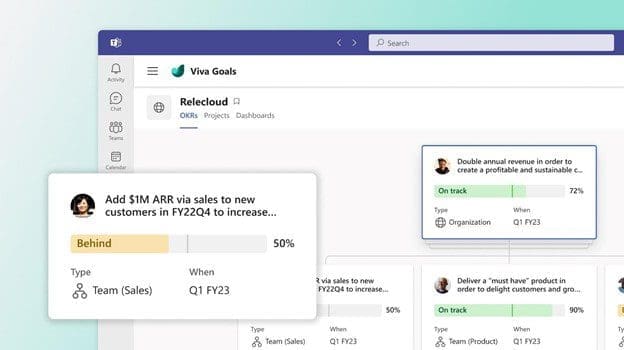
Viva Goals is one of the newest Viva applications from Microsoft. It connects teams so they’re moving toward a shared set of goals. Employees align, whether someone works in the accounting department or customer support.

Business leaders can look at Viva Goals as a way to solidify company objectives. They can then tie these objectives to meaningful targets for each department.

Viva Goals
Image from Microsoft

For example, say you have a corporate target to provide exceptional customer support. This goal by itself is generic. It doesn’t connect to what teams need to do to make it happen.

In Viva Goals, that target can have directives for various teams. Such as customer support reducing ticket resolution by 8 hours. This brings goals to a meaningful level and allows organizations to track progress.

Here are the key value-adds of using Viva Goals.

Aligns Your Team to the Same Goals

Viva Goals puts company goals and targets in a tangible form. There is a definition of success for teams and individuals. Work outcomes are directly connected to company-wide objectives.

Everyone is on the same page, rather than departments pursuing different targets. With alignment, companies can more easily reach their goals.

Maintains Focus on Goals

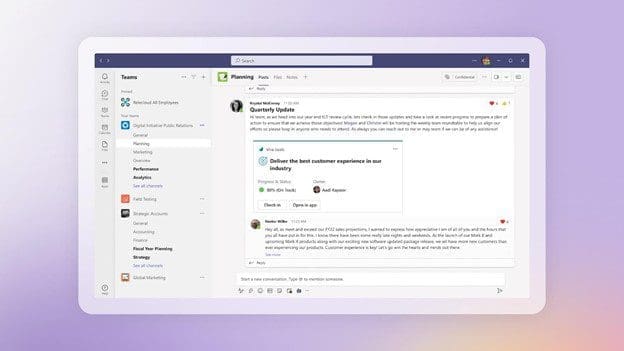
Viva connects to other M365 apps, making it easier to gather data insights. These insights help leaders more easily see goal progress.

Employees stay focused on goals. This is because goals connect to their daily work targets. Rather than being something they hear at a company event, goals get infused into the workflow.

Focus on Goals
Image from Microsoft

Integration with Teams & M365

The integration with Teams keeps goals front and center. Employees get recognized for meeting targets and helping the company achieve its goals. This keeps everyone engaged and moving together.

Progress towards goals isn’t kept on a spreadsheet on someone’s cloud drive. Instead, stats on goal achievement live in tools used daily. When goals remain visible, organizations have a better chance to achieve them.

How Do You Get Viva Goals?

If you want to subscribe to Viva Goals as an add-on to your M365 plan, it is currently $6.00/user/month.

For the entire suite of Viva applications, the current price is $9.00/user/month.

Questions About Microsoft 365 or Viva Goals?

Digital transformation with tools like Microsoft Viva is a necessity if you want to keep up. Old ways of doing things are giving way to the cloud, AI, and machine learning. We can help you navigate that territory. Give us a call and schedule a consultation to learn more.


Featured Image Credit

This Article has been Republished with Permission from The Technology Press.